
Field services
Field Service Vehicle Management That Keeps Technician Vans Ready for the Next Job
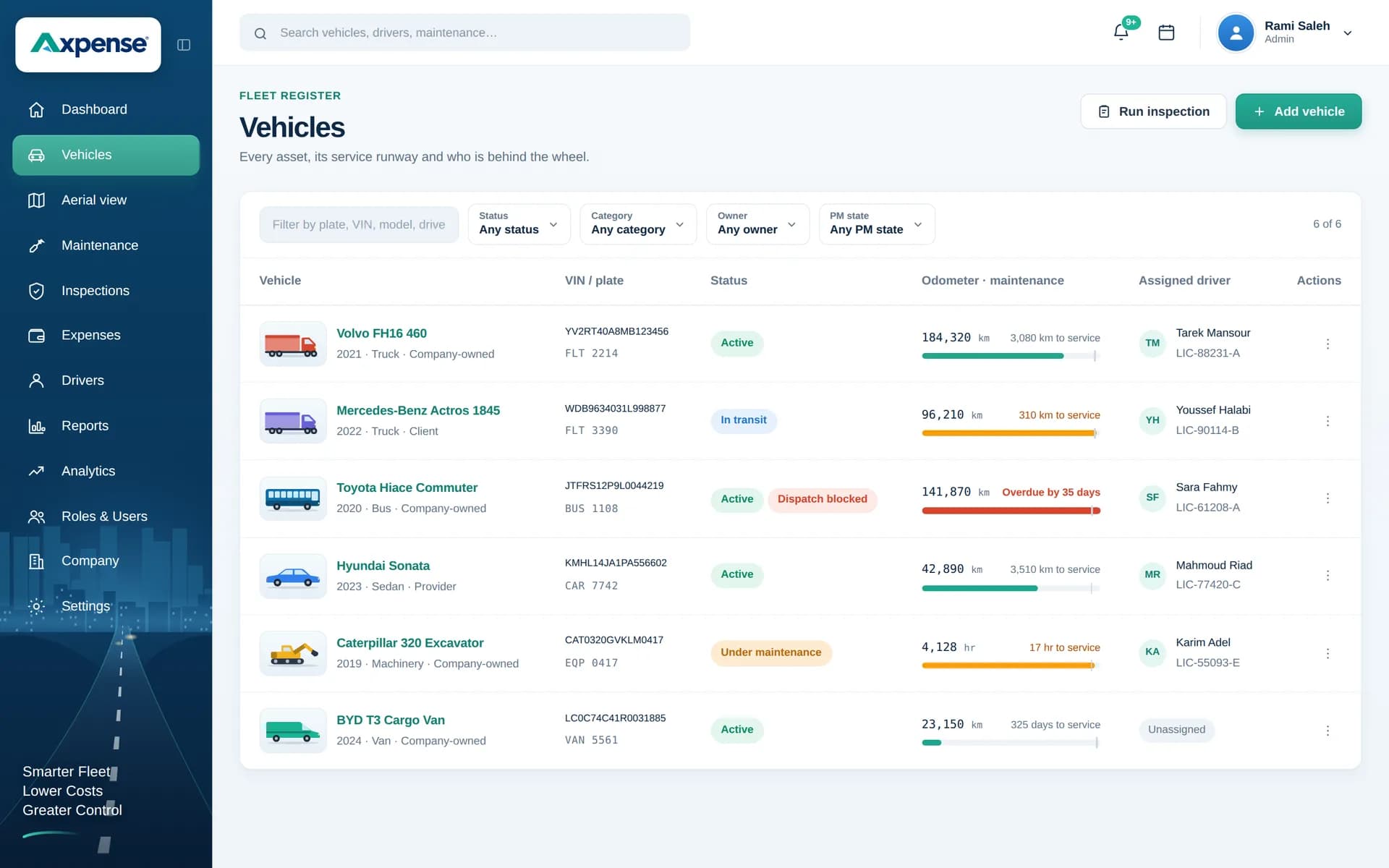
For a field service company, a technician without a working van is a technician who can’t reach the customer. Axpense keeps every service van on one record, with maintenance planned by kilometre, clear driver assignment for handovers and the cost of each van in view, so vehicles are ready when jobs are booked.
The vehicle problems field service teams face
HVAC contractors, elevator and lift companies, telecom installers, facility maintenance firms, pest control and security companies all depend on vans to get technicians to customers. The vehicle side of the business tends to break in the same places:
- A broken van cancels jobs. If a technician’s van is off the road, their appointments are moved or given to someone else, and the customer notices.
- Services clash with the job schedule. Maintenance gets postponed because the van is always “needed today”, until it breaks down on a day it was needed more.
- Vans change hands. Technicians go on leave, swap shifts or move teams, and the next person inherits damage and faults nobody wrote down.
- Costs are hidden in operations. Repairs and tyres are paid through petty cash or branch budgets, so the true cost of running each van is unknown.
Vehicles in a field service fleet
Most field service fleets are made of panel vans fitted with shelving for tools and stock, pickups for heavier equipment and outdoor work, small cars for supervisors and inspectors, and sometimes a few light trucks for larger installations.
In Axpense each vehicle has one record with plate, make, model, odometer, status and assigned technician. The status field makes it easy to see which vans are in service and which are in the workshop.
Maintenance needs: planned around the job schedule
The trick in field service is to service vans before they fail, on a day the planner chooses. Km-based maintenance makes that possible. Axpense stores each van’s service intervals in kilometres and shows how far each one is from its next service, so a planner looking at next week can see which vans will reach their interval and book them on a lighter day or pair them with a spare van.
Service vans do lots of city driving with frequent stops and heavy loads of tools, so brakes, tyres and suspension deserve attention. Record those parts through spare parts to see what went into each van. For more on scheduling, see our fleet maintenance software page and the preventive maintenance checklist.
Inspection needs: a check at every handover
Whenever a van passes from one technician to another, a short handover inspection protects both of them: tyres, lights, body damage, mirrors, cargo doors and shelving, and warning lights on the dashboard.
In Axpense you build a handover checklist once. Each item is marked pass or fail and recorded on the vehicle, and updating the driver assignment at the same time makes it clear who is responsible from that moment on. Faults found at handover stay on the vehicle record, rather than being discovered by the next technician in front of a customer. Our vehicle inspection software page explains the inspection module in detail.
Cost needs: cost per van and per technician team
Field service margins depend on how many jobs each technician completes, and the van is part of that cost. Axpense records repairs, parts, tyres, insurance, registration and other expenses per vehicle and category, and reports roll them up by vehicle.
As an example, if a van costs 36,000 SAR a year to run and the technician completes 1,200 jobs with it, the vehicle cost is 30 SAR per job. If an older van’s repairs push that to 45 SAR per job, replacing it may cost less than keeping it. Add depreciation from vehicle lifecycle management to see the whole picture, and see fleet cost tracking for the cost reports.
A field service workflow in Axpense
- 1
Register every service van
Plate, make, model, odometer and status, with the technician assigned to it.
- 2
Set km intervals
Axpense shows km left to each service, so planners can book vans on quieter days.
- 3
Inspect at every handover
A short checklist whenever a van changes technician, with failed items recorded on the vehicle.
- 4
Update the driver assignment
Responsibility moves with the van, so later expenses and inspections are linked to the right person.
- 5
Record costs as they happen
Repairs, tyres and insurance per van and category.
- 6
Check availability and cost weekly
See vans due soon, overdue services and cost per van on the dashboard.
Modules field service companies use
Vehicle management
Every van with its status, odometer and assigned technician.
Driver management
Assign technicians to vans and keep handovers clear.
Preventive maintenance
Km-based intervals so services can be planned around jobs.
Inspections
Handover and routine checklists recorded on each van.
Expenses
Every repair and running cost recorded per van.
Reports
Maintenance status and cost per van on one screen.
KPIs for field service fleets
Common measures in field service, built from the records you keep in Axpense and your job numbers.
Vans available each morning against technicians scheduled.
Services due in the next 1,000 km, to plan the coming week.
Services overdue, which should be rare in a planned fleet.
Vehicle cost per job or per technician.
Handover inspections with failed items, by van.
Example: an HVAC company with 25 technician vans
Consider a hypothetical air-conditioning maintenance company with 25 vans, two spare vans and a peak season every summer. Services are booked when a technician complains, and vans change hands whenever someone goes on leave.
The operations team registers every van in Axpense, assigns each to its technician and sets km-based service intervals. Before the summer peak, the planner checks which vans will reach their next service in the coming weeks and books them in during the quieter spring months. A handover checklist is introduced, so when a technician goes on leave, the van’s condition is recorded before the colleague takes it over.
By the end of the season, the team has a cost history for every van and can see which vans needed the most repairs during the busiest months, which feeds directly into next year’s replacement decisions.
Frequently asked questions
How does Axpense help keep technician vans available?
Km-based maintenance shows how far each van is from its next service, so planners can book services on quieter days instead of waiting for a breakdown. The status on each vehicle record shows which vans are in the workshop.
How should we handle a van changing technicians?
Run a short handover inspection and update the driver assignment at the same time. The checklist result is recorded on the van, so the condition at handover is clear to both technicians.
Does Axpense dispatch jobs or show where vans are?
No. Axpense manages the vehicles themselves: records, maintenance, inspections, parts and costs. Keep using your job scheduling tools for dispatch.
Can we see what each van costs to run?
Yes. Repairs, parts, insurance and other expenses are recorded per van and category, and reports show the total per vehicle. Our guide on how to calculate fleet costs helps you build the full monthly figure.
What does it cost for a small field service fleet?
Axpense is priced per vehicle per month with every feature included. A small fleet of 5–10 vehicles pays 350 EGP, 38 SAR or $10 per vehicle a month, and larger fleets pay less per vehicle. You can start free with no credit card, and onboarding is free. See the pricing page.
Related guides
How to Reduce Vehicle Downtime in a Company Fleet
How to reduce vehicle downtime: measure days off the road, work out what they cost, and cut them with maintenance, inspections, parts and workshop turnaround.
Read articleHow to Build a Preventive Maintenance Schedule for Fleets Based on Kilometres
Why kilometre-based service intervals beat calendar-only schedules, and how to build a preventive maintenance schedule your fleet will actually follow.
Read articleHow to Calculate Fleet Costs and Build a Fleet Budget
How to calculate fleet costs for the whole fleet: fixed vs variable costs, cost categories, a 20-vehicle monthly budget in EGP and a variance review routine.
Read articleSee Axpense with your own fleet
Book a short demo. We’ll set up a few of your vehicles and show you how it works day to day.