
Fleet management software
Fleet Management Software for Complete Fleet Control
Axpense brings every company vehicle, driver, service, inspection and expense into one system, so your operations team always knows what each vehicle needs next and what it costs to run.
What is fleet management software?
Fleet management software is a system that keeps the records, maintenance and costs of a company’s vehicles in one place. Instead of a spreadsheet for services, a WhatsApp group for problems and a folder of receipts for expenses, the fleet team works from one shared record per vehicle, with reminders for the work that is due.
For a business that runs 10, 50 or 500 vehicles, that single record is the difference between reacting to breakdowns and planning around them. Axpense is built for companies in Egypt, Saudi Arabia and the wider Middle East that run vans, trucks, pickups, company cars and service vehicles as part of their daily operations.
The problems fleet teams run into without a system
Most fleets don’t start with software. They start with an Excel sheet that one person updates, and it works until the fleet grows or that person goes on leave. The same problems show up in almost every company we speak to:
- Services get missed. Oil changes and periodic services are tracked from memory or a calendar, while the real trigger is how many kilometres the vehicle has driven. A van that drives 400 km a day reaches its service interval long before the date on the sheet.
- Nobody knows what a vehicle really costs. Repairs, spare parts, insurance and other expenses are paid from different budgets and never added up per vehicle, so it is hard to tell which vehicles should be replaced.
- Records are scattered. The service history is on paper at the workshop, the inspection forms are in a drawer and the driver assignment is in a message thread. When something goes wrong, rebuilding what happened takes days.
- Problems found in inspections are lost. A driver reports worn brakes, but the note never reaches the person who books the repair.
Fleet management software exists to close these gaps: one record per vehicle, reminders based on real usage, and costs attached to the vehicle they belong to.
How Axpense works, from vehicle to report
You can set up the basics in a day. Each step builds on the one before it, so the data you enter once keeps paying off.
- 1
Add your vehicles
Register each vehicle with its plate, make, model, odometer reading and purchase details. This becomes the single record everything else attaches to.
- 2
Assign drivers
Link drivers to the vehicles they use, so responsibility is clear and every inspection or expense can be traced to a person.
- 3
Set maintenance intervals by kilometre
Define service intervals in kilometres (for example every 10,000 km for an oil change). Axpense tracks the distance left until each service is due.
- 4
Run inspections with checklists
Drivers and supervisors complete checklist inspections, and failed items are recorded against the vehicle for follow-up.
- 5
Record expenses as they happen
Repairs, spare parts, insurance and other costs are logged against the vehicle, so the cost of each vehicle builds up automatically.
- 6
Review reports and dashboards
See services due, costs by vehicle and category, and the state of the fleet on one dashboard, without building a spreadsheet.
Everything a fleet team works with, in one platform
Each module does one job well and shares its data with the others. Open a module to see how it works in detail.
Vehicle management
One searchable record per vehicle: identification, odometer, status, assigned driver and full history.
Driver management
Assign drivers to vehicles and keep responsibility visible for every trip, inspection and expense.
Km-based preventive maintenance
Service reminders triggered by the kilometres each vehicle actually drives, not just by date.
Spare parts
Track spare parts from purchase to installation, and see which parts went into which vehicle.
Inspections
Checklist-based inspections with pass and fail results recorded on the vehicle’s history.
Expenses
Repairs, parts, insurance and other costs recorded against the vehicle they belong to.
Depreciation and lifecycle
Book value over time for each vehicle, to plan replacements and keep finance informed.
Reports and dashboards
Costs, maintenance status and fleet overview on one screen, ready to share with management.
Work orders
Turn a service or a failed inspection into a tracked work order with status and costs.
Every vehicle, and the distance left to its next service
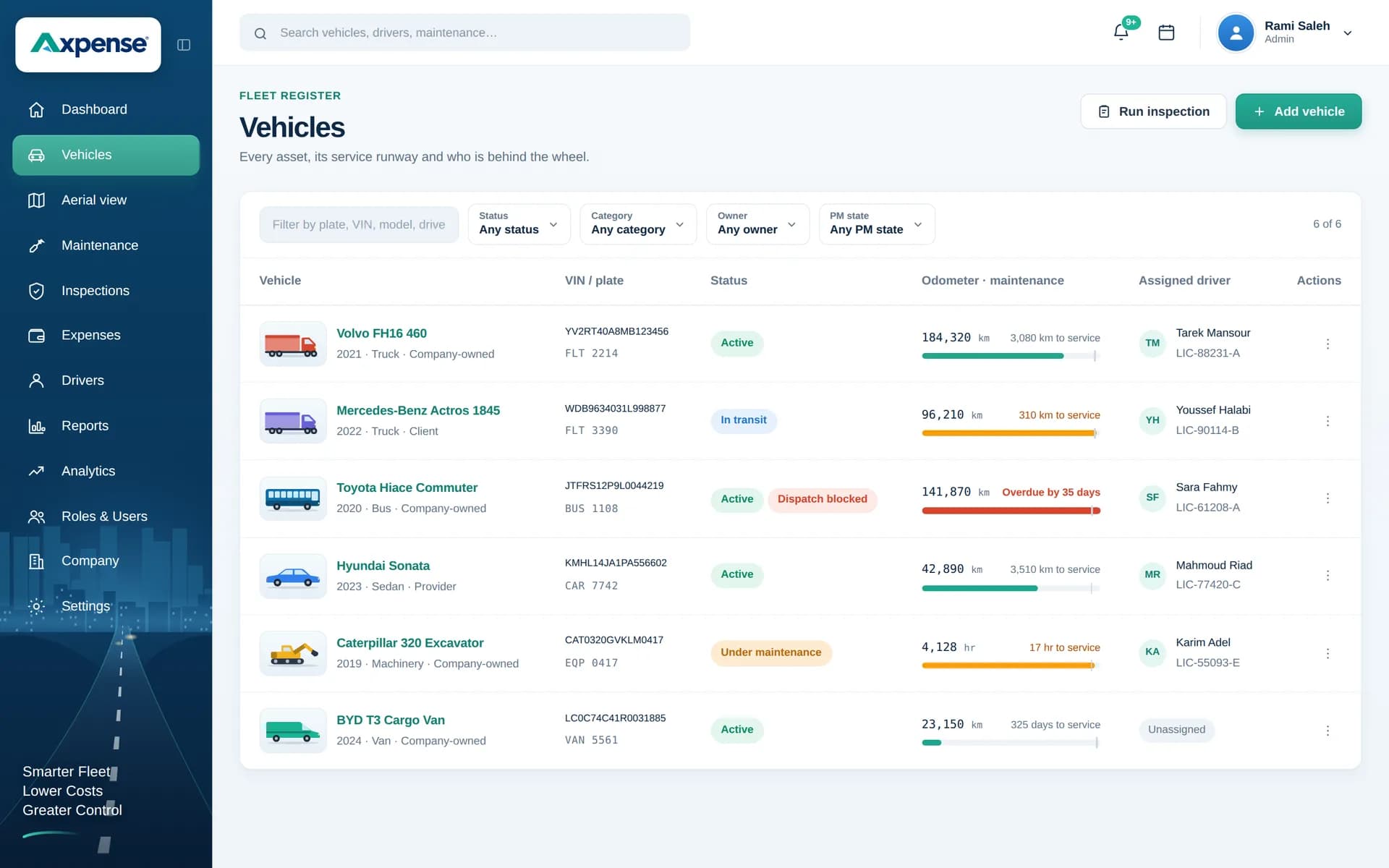
The vehicles screen shows the odometer and the kilometres remaining until the next service for every vehicle.
Dashboards that answer the questions managers actually ask
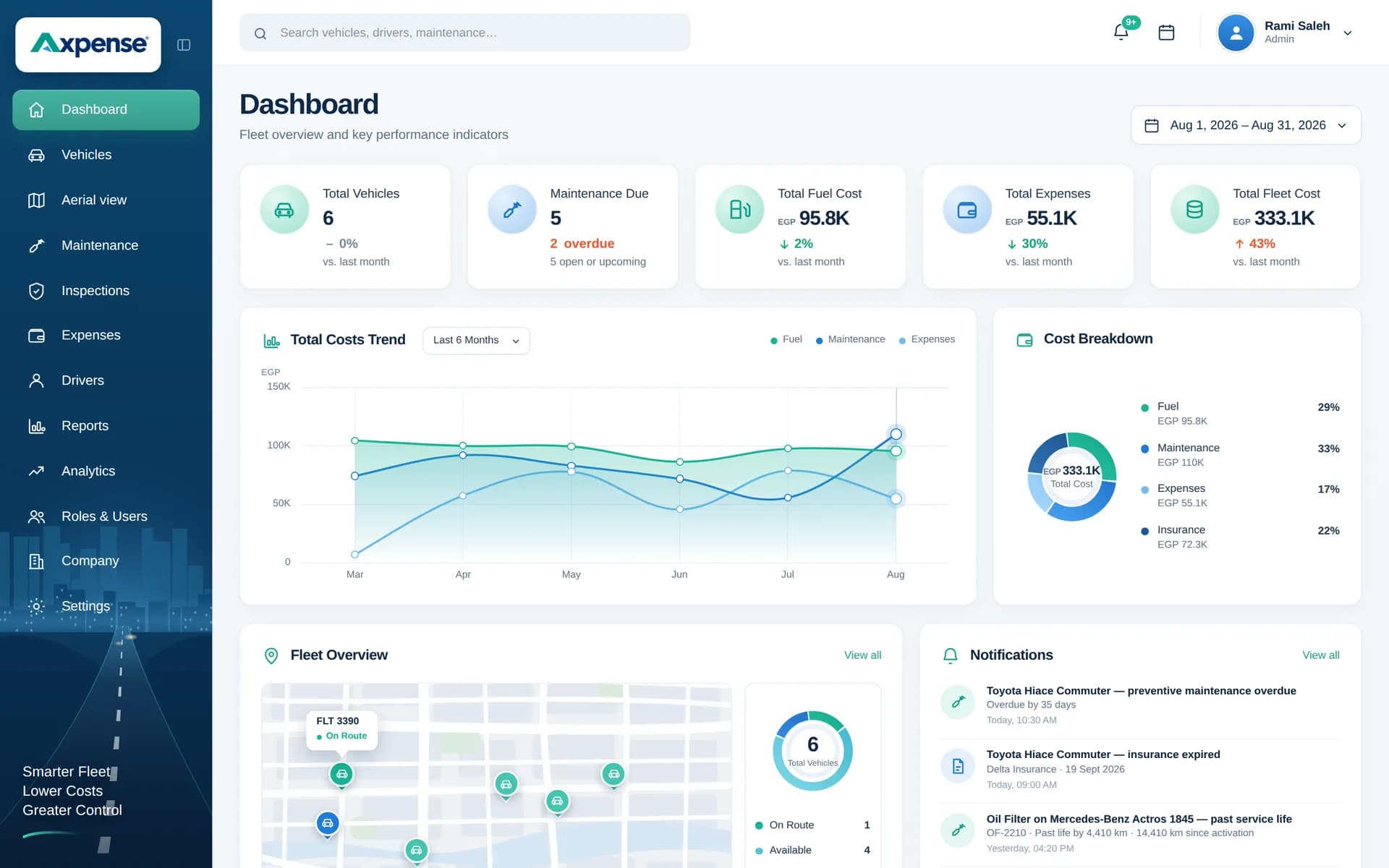
Fleet managers are asked the same questions every month: which vehicles are due for service, which ones are overdue, what the fleet cost this month and where the money went. The Axpense dashboard is built around those questions.
- Maintenance status shows services due soon and overdue, based on each vehicle’s kilometres.
- Cost overview shows total fleet spend and a breakdown by category, so a rise in repair costs is visible early.
- Vehicle drill-down takes you from the fleet total to the history of a single vehicle in one click.
Because every number comes from the records your team already keeps, the dashboard stays current without anyone preparing it. For the cost side in depth, see fleet cost tracking.
What changes when your fleet runs on one system
We don’t promise percentages we can’t prove for your business. These are the practical changes teams see in day-to-day work.
Services are planned from real kilometres, so fewer are missed or done too late.
Each vehicle has one complete history that anyone on the team can open.
The cost of every vehicle is visible, which makes replacement decisions easier to justify.
Problems found in inspections stay on record until someone deals with them.
Month-end reporting takes minutes instead of a day of collecting receipts and sheets.
New team members can pick up the fleet without relying on one person’s memory.
Fleet management, maintenance, costs and inspections: how the pieces fit
Fleet management is the umbrella. Underneath it, three jobs take most of a fleet team’s time, and each has its own page with more detail:
- Maintenance keeps vehicles available. Axpense schedules preventive maintenance by kilometre and keeps the full service history. Read more about our fleet maintenance software.
- Costs tell you whether each vehicle is still worth running. Axpense adds up every expense per vehicle and supports cost-per-km and total cost of ownership analysis. See fleet cost tracking.
- Inspections catch problems early. Checklists record the condition of each vehicle and keep failed items visible. See our vehicle inspection software.
You can start with the part that hurts most, usually missed services, and switch on the rest as your team gets comfortable.
Built for fleets across industries
Different industries run different vehicles, but they all need to know what is due, what is broken and what it costs.
Logistics and transportation
High-mileage trucks and vans where every day off the road costs money.
Distribution and FMCG
Many light vehicles across branches, with drivers changing between routes.
Construction
Pickups, trucks and site vehicles spread across projects.
Oil and gas
Field vehicles that need strict pre-trip inspections and heavy-duty servicing.
Manufacturing
Plant vehicles and company cars supporting production and delivery.
Field services
Technician vans that have to be available when a job is booked.
Made for companies in Egypt, Saudi Arabia and the Middle East
Axpense works in Arabic and English, so drivers, workshop staff and management can each use the language they are comfortable with. Pricing is available in Egyptian pounds, Saudi riyals and US dollars on our pricing page.
Onboarding is free and most teams are live in one day: we help you import your vehicles, set your first maintenance intervals and show your team the daily routine. Read more about fleet management software in Egypt, fleet management in Saudi Arabia and fleet management across the Middle East.
Frequently asked questions
What is fleet management software?
It is a system that keeps every company vehicle’s records, maintenance, inspections and costs in one place, with reminders for work that is due. Axpense does this for businesses in Egypt, Saudi Arabia and the Middle East.
What does Axpense track?
Vehicles, drivers and their assignments, km-based preventive maintenance and service history, spare parts, checklist inspections, expenses, depreciation, and dashboards and reports built from those records.
How is Axpense different from managing the fleet in Excel?
A spreadsheet only knows what someone typed into it. Axpense links every service, inspection and expense to the vehicle, calculates when the next service is due from the kilometres driven, and keeps the history even when people change. See fleet management in Excel vs software.
Does Axpense work in Arabic and English?
Yes. The platform is available in Arabic and English, so each person on your team can use the language they prefer.
How long does onboarding take?
Most teams are live in one day. Onboarding is free: we help you add your vehicles, set your first maintenance intervals and show your team the daily routine.
How much does Axpense cost?
Axpense is priced per vehicle per month, with every feature included. A fleet of 5–10 vehicles pays 350 EGP, 38 SAR or $10 per vehicle a month, and the price per vehicle falls as the fleet grows; for example, 25 vehicles cost 8,000 EGP a month. Billing annually saves 20%, and you can start free with no credit card. Every tier is on the pricing page.
Which industries use Axpense?
Logistics and transportation, distribution, construction, oil and gas, manufacturing and field services, as well as any company that runs its own vehicles. See industries.
Related Axpense pages
Related guides
What Is Fleet Management Software? A Plain Guide for Growing Fleets
What fleet management software is, what it actually does day to day, who needs it, and how to tell when your spreadsheet has stopped being enough.
Read articleFleet Management Excel Template vs Software: When to Switch
An honest comparison of a fleet management Excel template vs software: what a good sheet includes, where it breaks, and the signs it is time to switch.
Read articleHow to Build a Preventive Maintenance Schedule for Fleets Based on Kilometres
Why kilometre-based service intervals beat calendar-only schedules, and how to build a preventive maintenance schedule your fleet will actually follow.
Read articleSee Axpense with your own fleet
Book a short demo. We’ll set up a few of your vehicles and show you how it works day to day.