
Vehicle management
Vehicle Management Software: Every Vehicle on One Record
Axpense gives every vehicle in your fleet a single record: who drives it, how far it has gone, what was serviced, what failed inspection and what it has cost so far. Anyone on the team can open it and get the full picture in seconds.
What is vehicle management software?
Vehicle management software is a system that keeps one complete, shared record for each company vehicle, from its identification details to its service history and running costs. It replaces the registration folder, the workshop notebook and the spreadsheet column that someone forgot to update.
The point is not to store data for its own sake. When a manager asks "Can this pickup go to the site tomorrow?" or "Why did this van cost so much last quarter?", the answer should be one screen away. In Axpense, the vehicle record is that screen, and every other module (maintenance, inspections, spare parts, expenses and depreciation) writes into it.
What a vehicle record in Axpense holds
Each vehicle you register becomes the anchor for everything that happens to it. A typical record brings together:
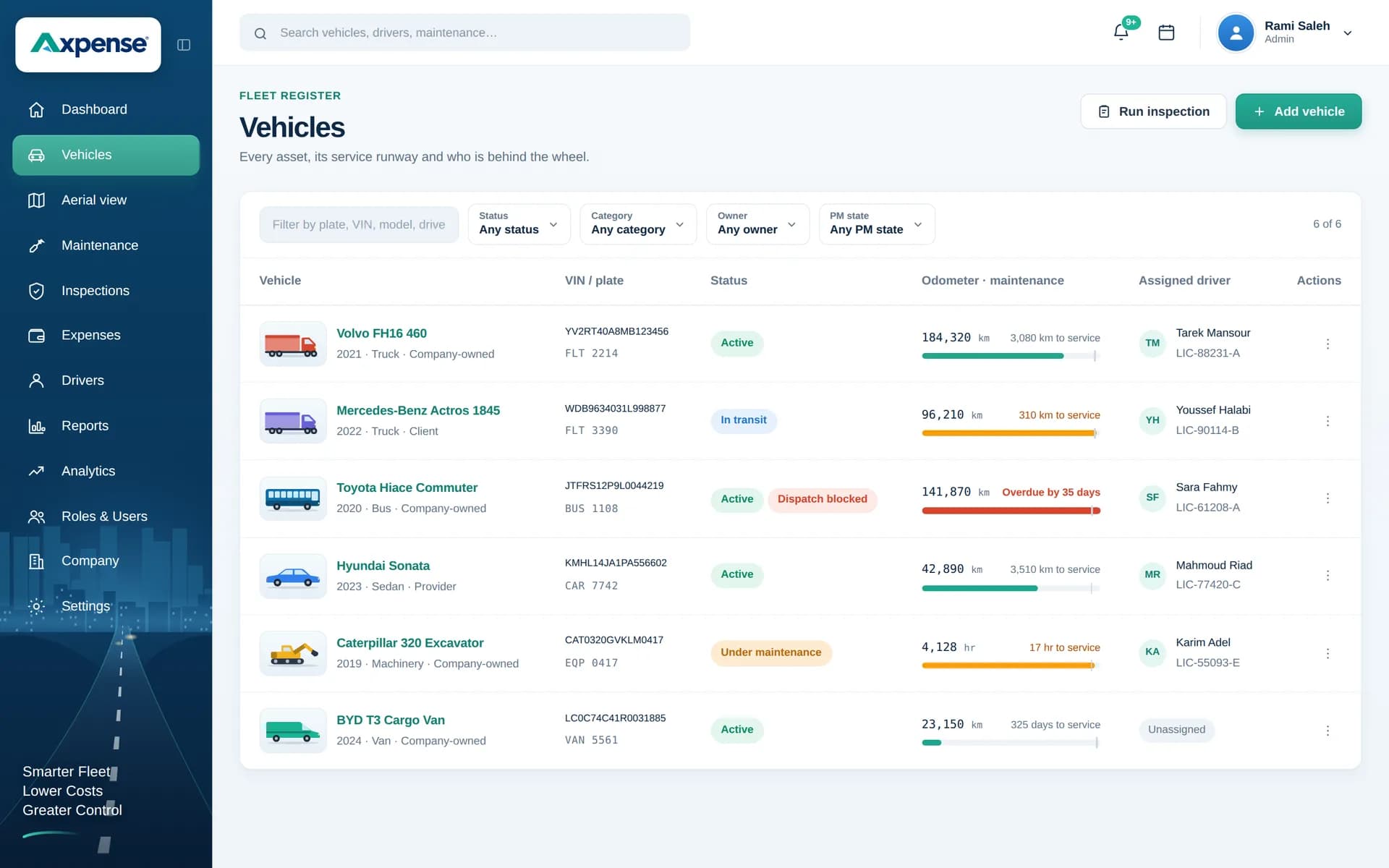
- Identification: plate number, make, model and the purchase details you use to tell vehicles apart and value them.
- Odometer: the latest kilometre reading, which drives the service schedule for that vehicle.
- Status: whether the vehicle is working or off the road, so planners can see what is actually available.
- Assigned driver: the person currently responsible for the vehicle.
- Service history: every preventive and corrective service, with the kilometres at which it was done.
- Inspections: checklist results, with failed items kept on the vehicle until they are dealt with.
- Spare parts: which parts were installed in this vehicle, and when.
- Expenses: repairs, parts, insurance, registration and other costs, grouped by category.
- Depreciation: book value over time, so you can see what the vehicle is worth on paper today.
How the vehicle record works day to day
Most teams set up their vehicle list on the first day and let the record build itself from normal work after that.
- 1
Register the fleet
Add each vehicle with its plate, make, model, current odometer and purchase details. Our free onboarding helps you bring an existing spreadsheet across.
- 2
Assign a driver
Link the vehicle to the driver who uses it, so responsibility is visible from the start.
- 3
Set its service intervals
Make sure the kilometre intervals for this type of vehicle are set, so Axpense can count down to the next service.
- 4
Keep the odometer current
Update the reading at a fixed routine, for example during the weekly inspection, so the countdown stays accurate.
- 5
Let work flow into the record
Services, inspections, installed parts and expenses are all recorded against the vehicle as they happen.
The whole fleet on one list
The vehicles list shows each vehicle’s odometer and how many kilometres remain before its next service.
Why the odometer reading matters so much
In most fleets the odometer is the single most useful number on the record. Service intervals are set in kilometres, cost per km is calculated from kilometres, and a vehicle that suddenly drives far less than usual is often a sign of a problem.
That is why it pays to agree on one routine for updating readings: at the weekly inspection, at each service, or at the end of each month. Pick the one your team will actually follow. For a deeper look at using kilometres to plan servicing, see km-based preventive maintenance.
Who uses the vehicle record
The same record answers different questions for different people.
Fleet managers
See which vehicles are available, which are due for service and which are costing more than they should.
Workshop supervisors
Check the service history and installed parts before starting a job, instead of asking the driver what was done last time.
Finance
Find every cost and the current book value of a vehicle without collecting receipts from three departments.
Drivers
Know which vehicle they are responsible for and complete its inspections against the right record.
One part of a complete fleet system
The vehicle record is the foundation of fleet management software: drivers, maintenance, inspections and costs all hang from it. If your first goal is to stop missing services, start with vehicles and intervals, then add inspections and expenses as the team settles in.
When a vehicle gets older, the same record feeds replacement decisions. Its depreciation and lifecycle view shows book value, while the expense history shows what it costs to keep running.
Frequently asked questions
What is the difference between vehicle management and fleet management?
Vehicle management is about the record of each individual vehicle: its details, odometer, driver, history and costs. Fleet management is the wider job of running all vehicles together, including maintenance planning, inspections and cost control across the fleet. In Axpense the vehicle record is the base the rest is built on.
What details do I need to add a vehicle?
The plate number, make, model and current odometer reading are enough to start. Adding purchase details lets Axpense calculate depreciation, and assigning a driver makes responsibility clear.
Can I import my existing vehicle list?
Yes. Onboarding is free and we help you bring your current spreadsheet into Axpense, so most teams are working with their full fleet on the first day.
How is the next service calculated for each vehicle?
From the latest odometer reading and the kilometre interval set for that vehicle. Axpense shows the kilometres left until the service is due and flags it as overdue once the interval is passed.
Can I see the total cost of a single vehicle?
Yes. Every expense recorded against the vehicle, including repairs, parts, insurance and registration, adds up on its record by category. You can use that total to work out cost per km.
Related Axpense pages
Related guides
What Is Fleet Management Software? A Plain Guide for Growing Fleets
What fleet management software is, what it actually does day to day, who needs it, and how to tell when your spreadsheet has stopped being enough.
Read articleFleet Management Excel Template vs Software: When to Switch
An honest comparison of a fleet management Excel template vs software: what a good sheet includes, where it breaks, and the signs it is time to switch.
Read articleHow to Calculate Vehicle Cost per km: Formula and Worked Examples
The formula for vehicle cost per km, which costs to include, worked examples in EGP and SAR, and the mistakes that make the number misleading.
Read articleSee Axpense with your own fleet
Book a short demo. We’ll set up a few of your vehicles and show you how it works day to day.