
Fleet maintenance software
Fleet Maintenance Software for Preventive Vehicle Maintenance
Axpense schedules every service from the kilometres each vehicle actually drives, reminds your team before a service falls due, and keeps a complete service history per vehicle, so fewer services are missed and fewer vehicles break down between jobs.
What is fleet maintenance software?
Fleet maintenance software is a system that plans, reminds and records the servicing of a company’s vehicles. It knows each vehicle’s odometer and service intervals, tells you which services are due or overdue, and keeps the full service history, spare parts and repair costs on the vehicle’s record.
The goal is simple: service vehicles before they fail, not after. Axpense does this for fleets in Egypt, Saudi Arabia and the Middle East, with intervals measured in kilometres rather than guessed from the calendar.
Why kilometre-based preventive maintenance beats calendar-only schedules
Most fleets start with a calendar: service every three or six months. The problem is that engines, brakes and tyres wear with distance, not with dates. Two identical pickups bought on the same day can be thousands of kilometres apart after a quarter.
For example, a delivery van in Cairo that drives 300 km a day covers about 7,500 km a month. If its oil service is due every 10,000 km, a quarterly calendar reminder arrives almost two services late. Meanwhile a pool car that sits in the car park most of the week gets serviced before it needs it, which wastes oil, parts and workshop time.
Kilometre-based preventive maintenance fixes both cases:
- High-mileage vehicles are serviced when their usage says so, before wear turns into a breakdown on the road.
- Low-mileage vehicles are not pulled off duty for work they don’t need yet.
- The workshop gets a predictable list of what is coming up, instead of a queue of emergencies.
Calendar limits still matter for some items, such as fluids that age even when a vehicle stands still, so follow the manufacturer’s guidance on both distance and time. The difference is that distance becomes the main trigger. Our feature page on km-based preventive maintenance shows the reminder logic in more detail.
How a service moves through Axpense
Every service follows the same path, from the first odometer reading to a permanent line in the vehicle’s history. Nothing depends on one person remembering.
- 1
Odometer reading is updated
The vehicle’s current kilometres are recorded on its profile. Every calculation that follows starts from this number.
- 2
The interval comes due
Axpense compares the odometer with the kilometres at the last service and the interval you set, and works out how many kilometres are left.
- 3
Your team gets a reminder
As a vehicle approaches its service point, it appears as due soon; if it passes that point, it is marked as overdue so it cannot be quietly forgotten.
- 4
The vehicle is serviced
The workshop or your service provider carries out the work, and the service is recorded against the vehicle with its date and odometer reading.
- 5
A work order tracks the job
The service is opened as a work order with its status, assigned technician and tasks, and closed when the vehicle is back on the road.
- 6
Spare parts are linked
Parts used in the service are recorded against the vehicle, so you know exactly which filter, pads or battery went into which vehicle.
- 7
The cost is recorded
Labour and parts are logged as expenses on the vehicle, adding to its running cost by category.
- 8
History is updated and the next interval starts
The service joins the vehicle’s history, and the countdown to the next service restarts from the new odometer reading.
Maintenance intervals and reminders
A good maintenance plan lists each service, the distance between services and what the service includes. In Axpense you set intervals in kilometres, and each vehicle shows the kilometres left until its next service. The table below gives typical ranges for light commercial vehicles as an example only; always follow the manufacturer’s schedule for your vehicles and adjust for heavy loads, heat and dust.
| Service | Example interval | Why it matters |
|---|---|---|
| Engine oil and filter | 5,000–10,000 km | Depends on oil type and driving conditions |
| Air filter | 15,000–30,000 km | Shorter on dusty roads and construction sites |
| Brake pads and discs check | 10,000–20,000 km | Wear rises with stop-start city driving |
| Tyre rotation and alignment | 10,000 km | Even wear extends tyre life |
| Major service | 40,000–60,000 km | Belts, fluids, plugs, full vehicle check |
Reminders work in two stages. A vehicle first shows as due soon as it gets close to the interval, which gives you time to book the workshop around its schedule. If the interval is passed, it shows as overdue, and it stays that way until the service is recorded. If you want a starting list of tasks for each service, use our free preventive maintenance checklist.
A complete service history for every vehicle
The service history is the record of everything that has been done to a vehicle: which service, on what date, at what odometer reading, with which parts and at what cost. It answers questions that paper files rarely can, such as when the timing belt was last changed or how often a particular truck has needed brake work this year.
In Axpense the history lives on the vehicle itself, next to its plate, make, model and assigned driver in vehicle management. When a vehicle moves between branches or a fleet coordinator leaves, the history stays. It also helps at resale time, because a buyer can see that the vehicle was maintained on schedule.
Services due, overdue and done, per vehicle
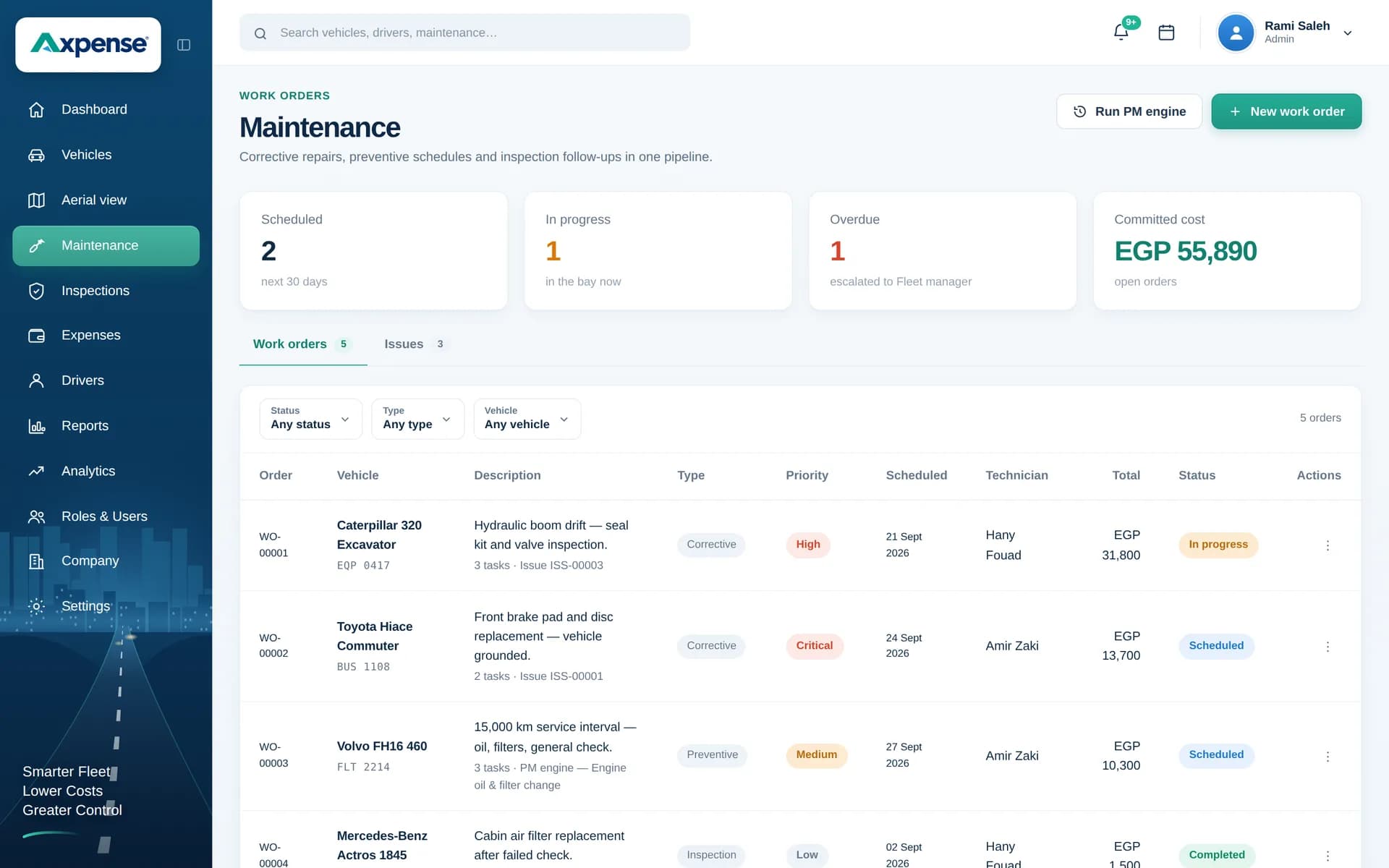
The maintenance screen shows each vehicle’s next service, the kilometres left and which services are already overdue.
Spare parts and their lifecycle
Most services consume parts: filters, pads, belts, batteries, tyres. When parts are bought in bulk and fitted over weeks, it becomes hard to say which part went where, whether it failed early, or whether the stock is being used on the vehicles it was bought for.
Axpense tracks spare parts from purchase to installation, so each part is linked to the vehicle it went into and the service it was fitted in. Over time that gives you a lifecycle per part: when it was installed, at what kilometres, and when it had to be replaced. If a brand of brake pads keeps wearing out after half the expected distance, the pattern shows up in the records. See spare parts management for how parts are recorded.
Maintenance costs, on the vehicle they belong to
Every service and repair recorded in Axpense can carry its cost, split into categories such as labour, parts and repairs, so maintenance spend adds up per vehicle without a separate spreadsheet. That makes it easy to spot the vehicle whose repair bills keep climbing. For cost per km, total cost of ownership and the wider cost picture, see fleet cost tracking.
How preventive maintenance reduces fleet downtime
Downtime is the time a vehicle cannot work: waiting for a tow, a diagnosis, a part or a workshop slot. Most of it comes from failures nobody planned for. These are the practical ways a maintenance system cuts it down.
Services are done at the right distance, so fewer components wear out on the road.
Planned work is booked around the vehicle’s schedule, on a quiet day, instead of in the middle of a delivery run.
Overdue vehicles are visible to everyone, so a missed service is caught within days, not months.
Repeat problems on the same vehicle show up in its history, pointing to a root cause instead of another quick fix.
Knowing which parts are coming due helps you have them ready before the vehicle arrives at the workshop.
Findings from vehicle inspections are recorded on the same vehicle record, so small defects are followed up before they become breakdowns.
Maintenance reports your managers will use
Reports are built from the services, parts and costs your team already records, so nobody has to prepare them at month end.
Maintenance status
Which vehicles are due soon and which are overdue, based on each vehicle’s kilometres, on one screen.
Maintenance cost by vehicle
What each vehicle has cost in services and repairs, so expensive vehicles stand out.
Cost by category
How spend splits between parts, labour and repairs across the fleet, and how it changes month to month.
Fleet overview
The state of the whole fleet at a glance, with a drill-down into any single vehicle’s history.
Frequently asked questions
How does km-based preventive maintenance work in Axpense?
You set a service interval in kilometres, for example an oil service every 10,000 km. Axpense takes the odometer reading at the last service, compares it with the current reading and shows the kilometres left. As the vehicle gets close it shows as due soon, and once the interval is passed it shows as overdue.
What happens when a service is overdue?
The vehicle is marked as overdue on the maintenance screen and dashboard, and it stays there until the service is recorded. That keeps a missed service in front of the team instead of hidden in a spreadsheet row.
Can I set different intervals for different vehicle types?
Yes. Intervals are set in kilometres for the services each vehicle needs, so a heavy truck and a light van don’t have to share one schedule. Use the manufacturer’s schedule for each model as your starting point.
What is a vehicle service history?
It is the complete record of the work done on a vehicle: each service with its date, odometer reading, parts used and cost. In Axpense it sits on the vehicle’s record and stays there when drivers or staff change.
How does fleet maintenance software reduce downtime?
It moves work from unplanned to planned. Vehicles are serviced at the right distance, overdue services are visible straight away, and repeat faults show up in the history, so fewer vehicles stop working without warning.
Can I record the spare parts used in a service?
Yes. Parts are tracked from purchase to installation and linked to the vehicle they were fitted to, so every service shows which parts were used and each part has its own lifecycle.
Do I need a workshop system as well?
No. Whether you use your own workshop or outside service centres, you record the service, parts and cost in Axpense against the vehicle. The workshop does the work; Axpense keeps the plan and the history.
Can a service be tracked as a work order?
Yes. A service can be opened as a work order with its tasks, status and costs, and closed once the vehicle is back in use. See work orders.
Related Axpense pages
Related guides
How to Build a Preventive Maintenance Schedule for Fleets Based on Kilometres
Why kilometre-based service intervals beat calendar-only schedules, and how to build a preventive maintenance schedule your fleet will actually follow.
Read articleHow to Reduce Vehicle Downtime in a Company Fleet
How to reduce vehicle downtime: measure days off the road, work out what they cost, and cut them with maintenance, inspections, parts and workshop turnaround.
Read articlePreventive vs Reactive Maintenance: Costs, Trade-offs and How to Switch
Preventive vs reactive maintenance for vehicle fleets: what each costs, when fixing on failure is acceptable, and how to move to planned servicing in stages.
Read articleSee Axpense with your own fleet
Book a short demo. We’ll set up a few of your vehicles and show you how it works day to day.