
Work orders
Fleet Work Order Software: Every Repair Tracked to Completion
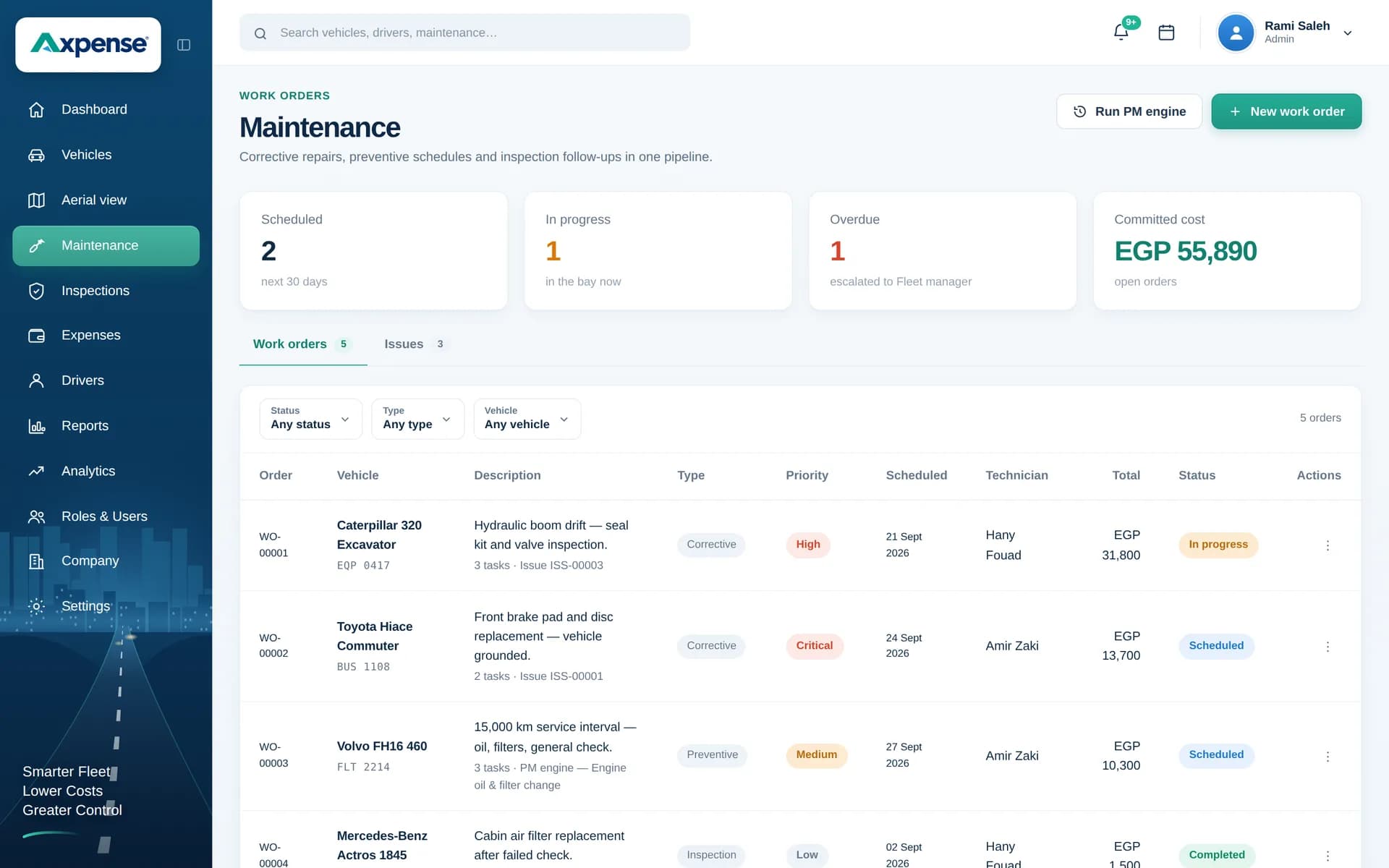
A work order turns "the van needs looking at" into a tracked job with an owner, a status, the parts used and the final cost. Axpense keeps each one on the vehicle’s record, so nothing stays half-finished and nobody has to chase the workshop for updates.
What is fleet work order software?
Fleet work order software records each maintenance or repair job as a work order, tracks it through its stages until it is complete, and keeps it in the vehicle’s history. A work order says what needs doing, on which vehicle, who is doing it, what it is costing and whether it is finished.
Without work orders, repairs are managed by phone calls and memory. The mechanic knows the job is waiting for a part; the fleet manager thinks the vehicle is ready; finance sees an invoice with no context. A work order gives everyone the same answer.
How work orders fit into Axpense
Work orders connect the parts of Axpense that already track your vehicles. A job usually starts from one of three places:
- A service that is due. The preventive maintenance screen shows a vehicle approaching or past its kilometre interval, and you open a work order for the service.
- A problem found in an inspection. A checklist item fails and needs a repair.
- A breakdown or driver report. Something went wrong on the road and needs fixing now.
Whatever the source, the work order lives on the vehicle. Parts used come from your spare parts records, costs are added to the vehicle’s expenses, and the finished job becomes part of its service history.
The life of a work order
Every work order moves through the same stages, so anyone can see where a job stands.
- 1Created
- 2Assigned
- 3In progress
- 4Parts and costs added
- 5Completed
- 6Saved to vehicle history
A work order stays open until someone marks it complete, so unfinished jobs remain visible.
Working a job from start to finish
Here is what happens at each stage.
- 1
Create the work order
Choose the vehicle, describe the job and note the odometer reading. Add whether it is a planned service or a repair.
- 2
Assign it
Give the job to a mechanic or an outside workshop, so there is one clear owner.
- 3
Move it to in progress
When work starts, update the status. The vehicle is now visibly off the road for this job.
- 4
Add parts and costs
Record the parts installed and the labour or workshop invoice. Parts are linked to the vehicle and costs go to its expenses.
- 5
Complete it
Close the work order when the vehicle is ready. If it was a planned service, the next kilometre countdown starts from here.
- 6
Keep the history
The finished work order stays on the vehicle’s record for future diagnosis, warranty questions and cost reviews.
Where most work orders begin
Services that are due or overdue are the most common starting point for a work order.
Why a closed work order is worth keeping
The value of a work order doesn’t end when the vehicle leaves the workshop. Over time, the list of completed work orders becomes the most honest description of each vehicle:
- Repeat repairs show up when the same job appears on the same vehicle again and again.
- Real repair costs are visible per vehicle and per job, not buried in a monthly workshop invoice.
- Downtime is easier to understand when you can see how long jobs stayed in progress.
That history is what lets you decide, with evidence, whether to keep repairing a vehicle or replace it. Read more on reducing vehicle downtime.
Who uses work orders
Workshop supervisors
See every open job, who owns it and what is waiting for parts.
Fleet managers
Know which vehicles are off the road and when they are expected back.
Finance
Match each workshop invoice to a job and a vehicle before it is paid.
Drivers
Report a problem and know it has become a tracked job, not a forgotten message.
Part of complete fleet maintenance
Work orders are the execution side of fleet maintenance software. Km-based preventive maintenance tells you what is due, inspections tell you what is wrong, and work orders make sure the job is done and recorded.
Frequently asked questions
What is a work order in fleet maintenance?
It is a record of one maintenance or repair job on one vehicle: what needs doing, who is doing it, its status, the parts used and the cost. It stays open until the job is complete.
What stages does a work order go through in Axpense?
Created, assigned, in progress, completed. Parts and costs are added while the job is in progress, and the completed work order is saved to the vehicle’s history.
Can a work order be created from a due service?
Yes. When the preventive maintenance screen shows a service due or overdue, you open a work order for that vehicle and service. Completing it restarts the kilometre countdown.
How are parts and costs handled?
Parts installed during the job are linked to the vehicle through your spare parts records, and the job’s costs are added to the vehicle’s expenses, so the vehicle’s total cost stays accurate.
Can an outside workshop be assigned to a work order?
Yes. You can assign a job to your own mechanic or to an outside workshop, and record its invoice as the job’s cost.
Related Axpense pages
Related guides
How to Reduce Vehicle Downtime in a Company Fleet
How to reduce vehicle downtime: measure days off the road, work out what they cost, and cut them with maintenance, inspections, parts and workshop turnaround.
Read articlePreventive vs Reactive Maintenance: Costs, Trade-offs and How to Switch
Preventive vs reactive maintenance for vehicle fleets: what each costs, when fixing on failure is acceptable, and how to move to planned servicing in stages.
Read articleHow to Build a Preventive Maintenance Schedule for Fleets Based on Kilometres
Why kilometre-based service intervals beat calendar-only schedules, and how to build a preventive maintenance schedule your fleet will actually follow.
Read articleSee Axpense with your own fleet
Book a short demo. We’ll set up a few of your vehicles and show you how it works day to day.