
Expense management
Fleet Expense Management Software That Puts Every Cost on the Right Vehicle
Record repairs, spare parts, insurance, registration and other costs against the vehicle they belong to, in the category they belong in. Axpense adds them up for you, so the monthly total and the cost of each vehicle are ready without a spreadsheet.
What is fleet expense management software?
Fleet expense management software is where a company records what it spends on each vehicle, so running costs can be added up by vehicle, by category and by month. It replaces the mix of invoices, petty-cash notes and accounting entries that rarely say which vehicle a cost belonged to.
In most companies, vehicle costs are paid correctly but recorded badly. Finance knows the company spent 180,000 EGP on repairs last quarter; nobody can say that 60,000 EGP of it went into two old pickups. Recording each expense against its vehicle is what turns a ledger total into a decision you can act on.
How expense recording works in Axpense
Every expense in Axpense is linked to one vehicle and one category, with its date and amount. The standard categories cover the costs fleets record most often:
- Repairs: workshop labour, breakdown repairs, bodywork.
- Spare parts: tyres, batteries, filters and other parts bought for a vehicle.
- Insurance: annual or instalment premiums for each vehicle.
- Registration: licensing and registration fees.
- Other: anything that doesn’t fit above, such as towing or parking fines.
Because the expense sits on the vehicle, it shows up in that vehicle’s history next to its services and inspections. Opening a vehicle tells you what has been done to it and what it has cost, in one place.
Parts bought through the spare parts module keep their own purchase-to-installation history, so you can see both what a part cost and which vehicle it went into.
A simple monthly expense routine
The routine below keeps the numbers current with a few minutes of work each week.
- 1
Record the expense when the invoice arrives
Choose the vehicle, pick the category and enter the date and amount. Recording as you go is faster than a month-end catch-up.
- 2
Keep the paper trail in order
As a practice, file each receipt by month and plate number so any recorded expense can be checked against its original.
- 3
Record fuel spend per vehicle
Log fuel purchases as expenses on the vehicle, so fuel sits alongside repairs and parts in the vehicle’s total.
- 4
Review the month’s totals
Check the total for the month and the breakdown by category on the dashboard, and look for anything unusual.
- 5
Compare vehicles
Look at cost by vehicle to find the vehicles that cost the most to run, then ask why.
Monthly totals and costs by category at a glance
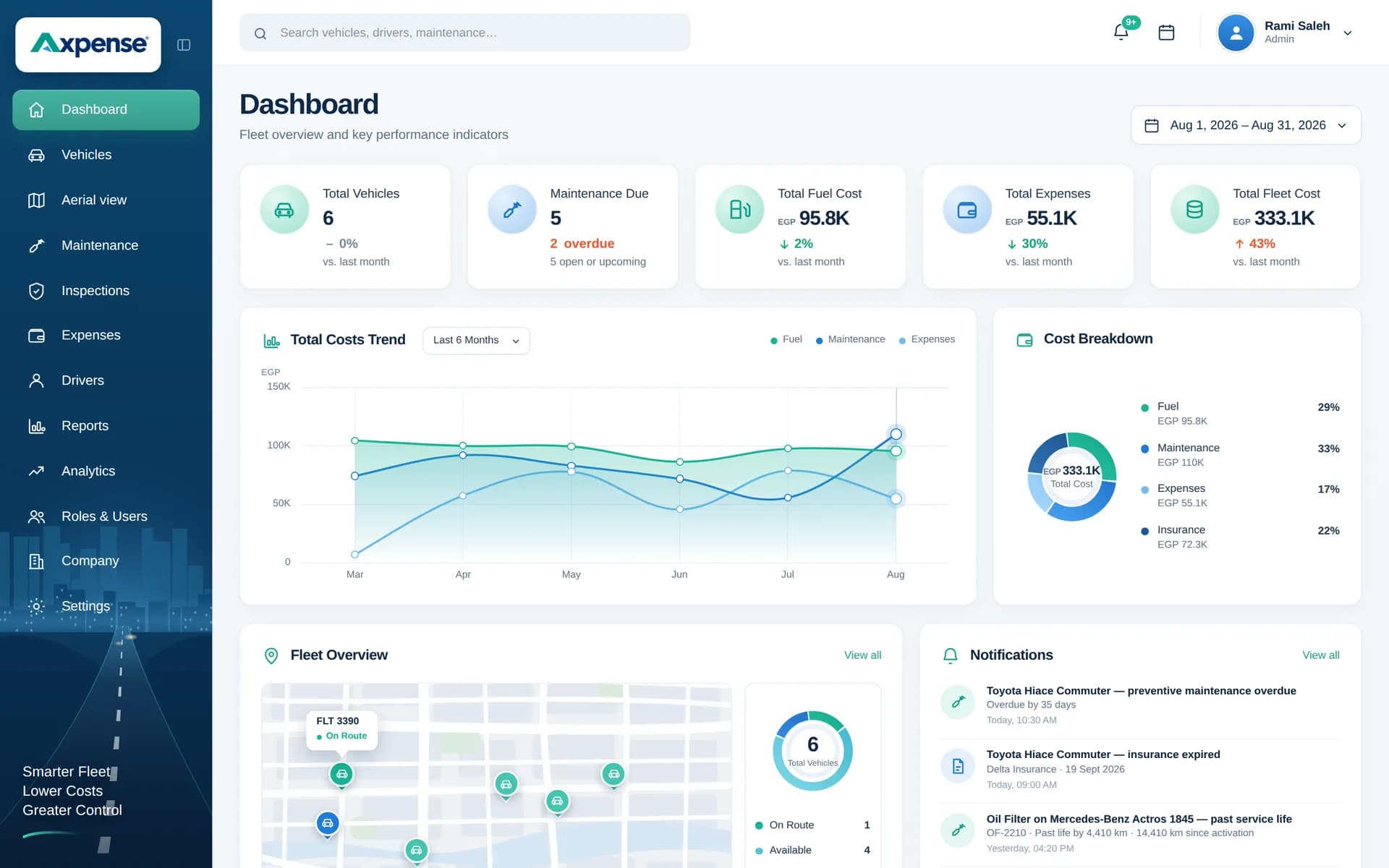
The dashboard adds up recorded expenses by category and by vehicle, with no spreadsheet to maintain.
Example: what cost by vehicle reveals
Here is an example of one month for three delivery vans in a small fleet. The numbers are illustrative.
| Vehicle | Repairs | Spare parts | Insurance | Other | Total (EGP) |
|---|---|---|---|---|---|
| Van A (2018) | 14,500 | 6,200 | 2,400 | 300 | 23,400 |
| Van B (2021) | 1,200 | 2,100 | 2,900 | 0 | 6,200 |
| Van C (2022) | 0 | 1,800 | 3,100 | 150 | 5,050 |
The fleet total of 34,650 EGP looks unremarkable. The per-vehicle view tells a different story: the oldest van accounts for about two thirds of the month’s spend, mostly on repairs. One month proves nothing, but if the same pattern repeats for a quarter, it is a strong case for replacing that van. The depreciation and lifecycle module helps you weigh that cost against the vehicle’s remaining book value.
Who uses expense records
- Fleet managers record expenses and review cost by vehicle to spot vehicles that are becoming expensive.
- Finance and accounting teams get monthly totals by category without chasing the operations team for a spreadsheet.
- Branch or site managers see what the vehicles under their responsibility cost.
- Management gets a clear answer to “what does our fleet cost us each month?”
For cost per kilometre and total cost of ownership, the calculations that build on these records, see our fleet cost tracking page and the free fleet cost per km calculator.
Frequently asked questions
Which expense categories can I record?
Repairs, spare parts, insurance, registration and an “other” category for costs that don’t fit elsewhere. Every expense is recorded against a specific vehicle.
Can I see the total cost of each vehicle?
Yes. Because every expense is linked to a vehicle, Axpense adds them up per vehicle and shows cost by vehicle on the dashboard, while each expense also appears in the vehicle’s history.
Can I see monthly fleet expenses by category?
Yes. The dashboard shows spend by category and the cost trend over time, so a rise in repair spending is visible early.
Should I keep paper receipts?
Yes, as good practice and for your accountant. We suggest filing receipts by month and plate number so each recorded expense can be matched to its original.
How is this different from our accounting system?
Your accounting system records what the company paid. Axpense records which vehicle the money went to and why, which is what you need to manage the fleet. Many teams use both.
Can I record fuel as an expense?
Yes. Fuel purchases can be recorded as expenses per vehicle, so fuel is included in each vehicle’s running cost. See fuel expense tracking.
Related guides
How to Calculate Fleet Costs and Build a Fleet Budget
How to calculate fleet costs for the whole fleet: fixed vs variable costs, cost categories, a 20-vehicle monthly budget in EGP and a variance review routine.
Read articleHow to Calculate Vehicle Cost per km: Formula and Worked Examples
The formula for vehicle cost per km, which costs to include, worked examples in EGP and SAR, and the mistakes that make the number misleading.
Read articleFleet Total Cost of Ownership: How to Calculate TCO and Compare Vehicles
How to calculate fleet total cost of ownership, compare two vehicles on TCO, and use the numbers to decide when a vehicle should be replaced.
Read articleSee Axpense with your own fleet
Book a short demo. We’ll set up a few of your vehicles and show you how it works day to day.