
Drivers
Driver Management Software: Clear Responsibility for Every Vehicle
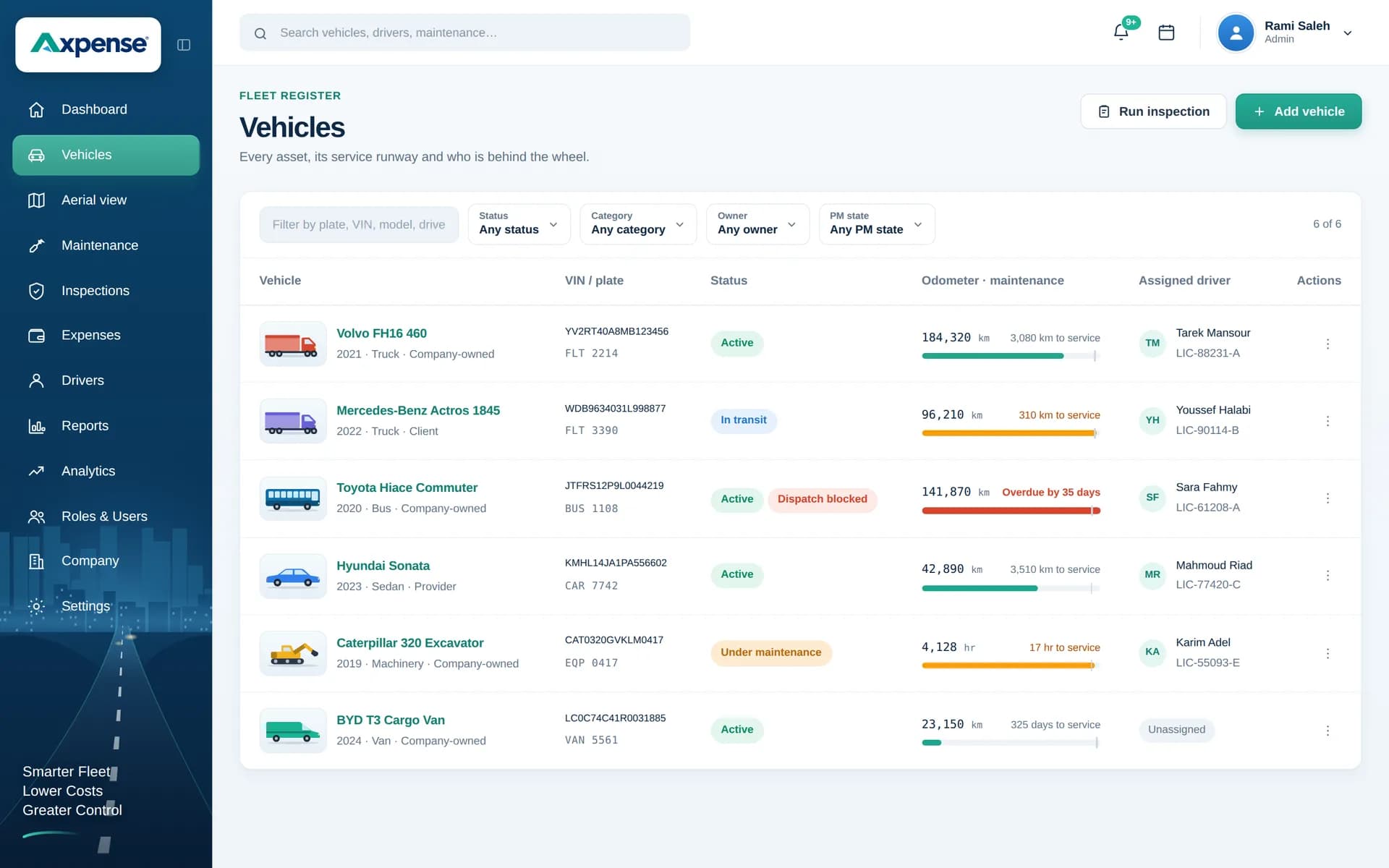
Assign each driver to the vehicle they use, and Axpense keeps that link on the record. When a vehicle comes back with a problem or an unexpected cost, you know who had it and can follow up with the right person.
What is driver management software?
Driver management software keeps a record of the people who drive your company vehicles and which vehicle each one is responsible for. It answers a simple but important question at any moment: who has this vehicle?
In many companies that answer lives in a WhatsApp message or in the memory of the transport supervisor. It works until a vehicle comes back with a dent, a missed inspection or a repair nobody approved. In Axpense, drivers are part of the vehicle record, so responsibility is written down rather than remembered.
How driver assignment works in Axpense
You add your drivers once, then assign each one to a vehicle. From that point the assignment shows on the vehicle’s record and on the vehicles list, so anyone can see who is responsible.
The assignment matters most for the records that follow:
- Inspections completed on the vehicle can be traced to the driver responsible for it, so a skipped weekly check has a name attached.
- Expenses recorded against the vehicle can be traced to the driver who had it, which helps when a repair or a cost needs an explanation.
- Maintenance reminders become easier to act on, because you know exactly whom to call to bring the vehicle in.
When a driver moves to another vehicle, you update the assignment and the new driver takes over responsibility from that point.
Driver management, step by step
The workflow follows the way vehicles actually change hands in a working fleet.
- 1
Add your drivers
Create a record for each driver who uses company vehicles, including drivers who only cover shifts.
- 2
Assign drivers to vehicles
Link each driver to the vehicle they are responsible for. The vehicle record now shows the assigned driver.
- 3
Let records build around the assignment
Inspections and expenses on the vehicle are recorded while the driver is responsible for it.
- 4
Hand over properly
When the vehicle changes hands, run an inspection, note the odometer, then update the assignment.
- 5
Follow up with the right person
When a failed inspection item or an unusual cost appears, you already know whom to ask.
See who is responsible for each vehicle
The vehicles list shows the assigned driver for each vehicle, next to its odometer reading.
A good vehicle handover between drivers
Most disputes about damage and missing items start at a handover that was never recorded. This routine takes about ten minutes and protects both drivers.
Complete an inspection checklist with the outgoing driver present.
Record the odometer reading at the moment of handover.
Note any failed checklist items so they stay on the vehicle’s record.
Check that tools, spare wheel and vehicle papers are in the vehicle.
Update the driver assignment in Axpense before the vehicle leaves.
Who uses driver management
Fleet and transport managers
Plan who drives what, see every assignment in one list and handle changes when drivers are on leave.
Supervisors
Check that each driver completes the inspections for their vehicle and follow up on failed items.
Finance
Trace a vehicle expense back to the driver who had the vehicle when it happened.
Drivers
Know exactly which vehicle they are responsible for, and have a record that protects them at handover.
Built on records and responsibility
Driver management in Axpense is about who is responsible for which vehicle and what happened while they had it. It works from the records your team keeps: assignments, inspections, odometer readings and expenses. That makes it practical for fleets of any size, without installing hardware in every vehicle.
Drivers are one part of Axpense fleet management software. Each assignment sits on the vehicle record, and the checklists drivers complete are covered in inspection management.
Frequently asked questions
What is driver assignment in fleet management?
It is linking each driver to the vehicle they are responsible for. In Axpense the assignment shows on the vehicle record, so everyone can see who has which vehicle.
Can one driver use different vehicles over time?
Yes. When a driver moves to another vehicle, you update the assignment. The new driver is responsible from that point, and the records made before the change stay with the vehicle.
How does Axpense link inspections and expenses to a driver?
Inspections and expenses are recorded on the vehicle, and the vehicle has an assigned driver. That makes it possible to trace a failed check or a cost back to the person who was responsible for the vehicle.
What should happen when a vehicle is handed to another driver?
Run an inspection with both drivers present, record the odometer reading, note any failed items and then update the assignment. Our daily vehicle inspection checklist is a good starting point.
Do I need a tracking device in each vehicle to manage drivers?
No. Driver management in Axpense is built on assignments and the records linked to them, such as inspections, odometer readings and expenses, so it works without installing anything in the vehicle.
Related Axpense pages
Related guides
Daily Vehicle Inspection Checklist: What Drivers Should Check Before Every Trip
A practical daily vehicle inspection checklist for company fleets: what to check, how to finish in five minutes, and what to do when an item fails.
Read articleWhat Is Fleet Management Software? A Plain Guide for Growing Fleets
What fleet management software is, what it actually does day to day, who needs it, and how to tell when your spreadsheet has stopped being enough.
Read articleSee Axpense with your own fleet
Book a short demo. We’ll set up a few of your vehicles and show you how it works day to day.