
Preventive maintenance
Preventive Maintenance Software for Fleets, Driven by Kilometres
Set service intervals in kilometres, and Axpense counts down the distance left for every vehicle. Your team sees what is due soon and what is overdue, and plans the workshop around it instead of reacting to breakdowns.
What is preventive maintenance software for fleets?
Preventive maintenance software for fleets schedules routine services, such as oil changes, filters and brake checks, before a vehicle fails, and reminds the team when each one is due. The alternative, fixing vehicles only when they break, costs more in repairs, towing and lost working days.
For most company vehicles the honest trigger for a service is distance, not the calendar. A delivery van can cover in two months what a manager’s car covers in a year. That is why Axpense plans preventive maintenance in kilometres.
How km-based intervals work in Axpense
Each service item has an interval in kilometres. Axpense knows the odometer reading when the service was last done and the vehicle’s current reading, so it can tell you three things at any moment:
- Km left until service: how far the vehicle can go before the next service is due.
- Due soon: vehicles approaching their interval, so you can book the workshop in advance.
- Overdue: vehicles that have passed the interval and should be serviced first.
When the service is done, the team records it and the countdown restarts from the new reading. The completed service stays in the vehicle’s service history, with the kilometres at which it was carried out.
The calculation behind every reminder
There is nothing hidden in the countdown. It uses two simple formulas.
Next service due at
Odometer at last service + service interval (km)
Km left until service
Next service due at − current odometer
Worked example
For example, a pickup had its oil changed at 48,000 km and uses a 10,000 km interval, so the next change is due at 58,000 km. With the odometer now at 55,500 km, it has 2,500 km left. If the reading goes past 58,000 km before the service is recorded, the vehicle shows as overdue.
Different intervals for different vehicles
A sedan, a light van and a heavy truck don’t share one schedule, and a vehicle working in heat, dust or short stop-start trips usually needs shorter intervals than one on the highway. In Axpense you set intervals per vehicle type, so each group of similar vehicles follows its own schedule.
The table below shows typical example intervals for light vehicles. They are a starting point only: always follow the manufacturer’s schedule for each model and your workshop’s advice for your operating conditions.
| Service item | Example interval (light vehicles) |
|---|---|
| Engine oil and filter | 5,000–10,000 km |
| Tyre rotation and pressure check | every 10,000 km |
| Brake pads and discs inspection | every 10,000–15,000 km |
| Air filter | 15,000–30,000 km |
| Cabin filter | 15,000–20,000 km |
For a complete list you can print and adapt, use our fleet preventive maintenance checklist.
The preventive maintenance routine
Once intervals are set, the weekly routine takes minutes.
- 1
Set intervals by vehicle type
Enter the kilometre interval for each service item, based on the manufacturer’s schedule.
- 2
Record the last service
For each vehicle, enter the odometer reading at which each item was last done so the countdown starts from the right point.
- 3
Keep odometer readings current
Update readings on a fixed routine so the km left stays accurate.
- 4
Review due and overdue services
Check the reminders, book overdue vehicles first and schedule those due soon.
- 5
Record the completed service
Log the service with its date, odometer and cost. The next interval starts automatically.
Due soon and overdue, at a glance
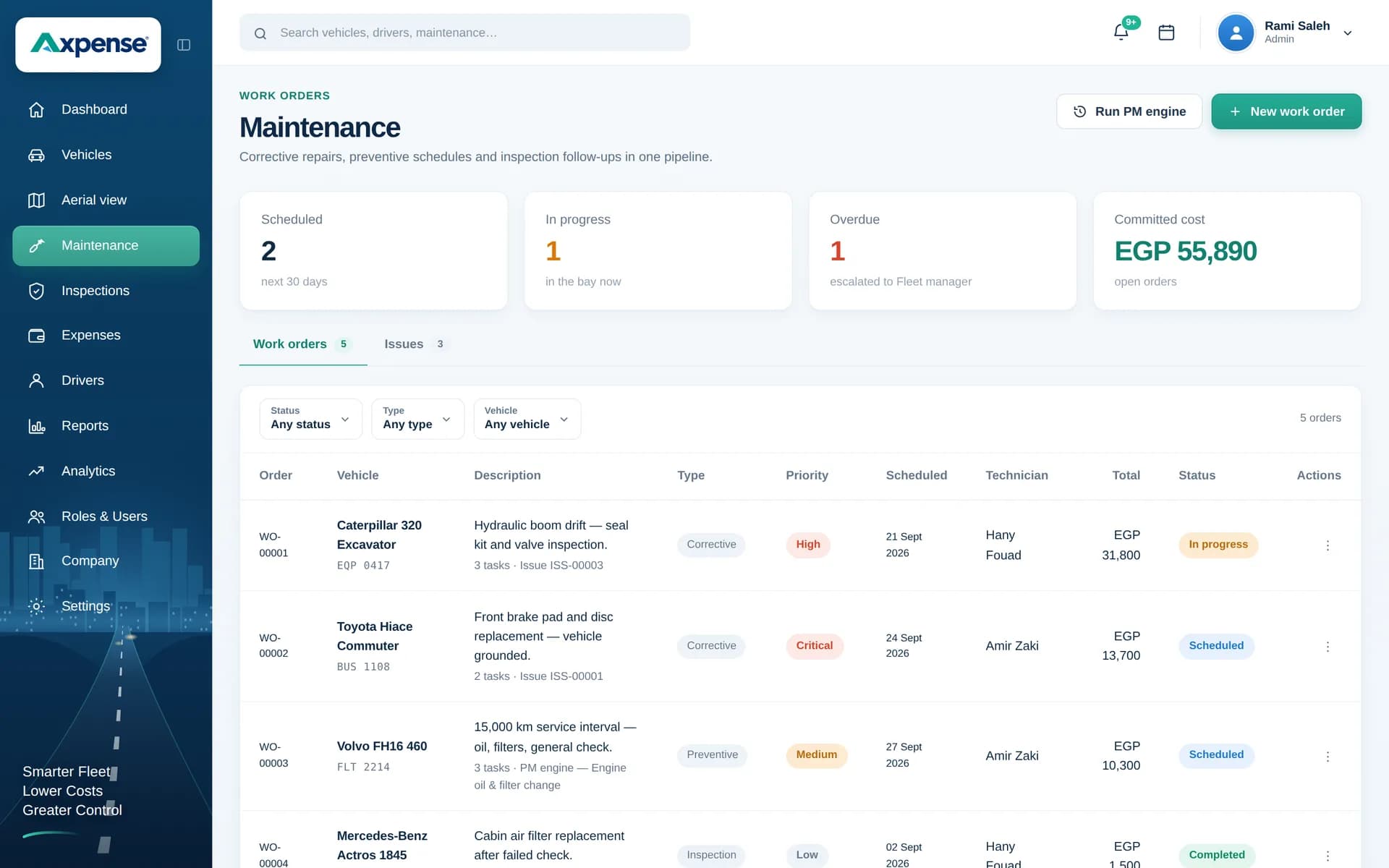
The maintenance screen shows the kilometres left for each service and makes overdue vehicles stand out.
Who uses preventive maintenance
Fleet managers
Plan the week’s services and see at once whether anything has slipped past its interval.
Workshop supervisors
Balance the workshop load by booking vehicles that are due soon before they become overdue.
Drivers
Keep odometer readings up to date and bring the vehicle in when its service is due.
Finance
See routine service costs recorded per vehicle, separate from breakdown repairs.
Kilometres first, with the calendar as a backstop
Some items age even when a vehicle barely moves, such as batteries, coolant and rubber parts. Many manufacturers therefore write intervals as "every X km or Y months, whichever comes first". Kilometres remain the main trigger for a working fleet, so keep time-based checks on your workshop checklist as a backstop for low-use vehicles.
Preventive maintenance is one part of fleet maintenance software, which also covers service history, spare parts and inspections. To compare approaches, read preventive vs reactive maintenance.
Frequently asked questions
Why schedule maintenance by kilometres instead of dates?
Because wear follows distance. Two identical vans can drive very different kilometres in the same month, so a date-based schedule services one too early and the other too late. Kilometre intervals match service to real use.
How does Axpense know when a service is due?
It compares the vehicle’s current odometer reading with the reading at the last service plus the interval you set. The result is the kilometres left, and the service is flagged as overdue once that number passes zero.
Can different vehicles have different intervals?
Yes. You set intervals per vehicle type, so sedans, vans and trucks each follow a schedule that suits them. If some vehicles work in harder conditions, ask your workshop whether a shorter interval makes sense.
What interval should I use for oil changes?
Follow the manufacturer’s schedule for each model. As an example, many light vehicles fall in a 5,000–10,000 km range depending on the oil and the operating conditions. Our guide to km-based preventive maintenance explains how to set a schedule.
What happens when a service is completed?
You record it with the date, odometer reading and cost. It is added to the vehicle’s service history and the countdown to the next service starts from the new reading.
Related Axpense pages
Related guides
How to Build a Preventive Maintenance Schedule for Fleets Based on Kilometres
Why kilometre-based service intervals beat calendar-only schedules, and how to build a preventive maintenance schedule your fleet will actually follow.
Read articlePreventive vs Reactive Maintenance: Costs, Trade-offs and How to Switch
Preventive vs reactive maintenance for vehicle fleets: what each costs, when fixing on failure is acceptable, and how to move to planned servicing in stages.
Read articleHow to Reduce Vehicle Downtime in a Company Fleet
How to reduce vehicle downtime: measure days off the road, work out what they cost, and cut them with maintenance, inspections, parts and workshop turnaround.
Read articleSee Axpense with your own fleet
Book a short demo. We’ll set up a few of your vehicles and show you how it works day to day.